
Is your Customer Agent connected to your knowledge base but still giving customers half-right or oddly specific answers? The problem usually isn't which articles you've added as content sources — it's how those articles are written.
HubSpot's AI reads your knowledge base very differently to a human skimming it, and an article that makes perfect sense to a person can quietly confuse an agent. Here's how to reformat your existing content so the agent actually finds and quotes the answer you meant it to.
Top tip: write every section as if it's the only paragraph the agent will ever read.
The agent doesn't read articles top to bottom the way a person does — it retrieves the chunk that looks most relevant to the question, so that chunk needs to stand entirely on its own.
Here's how to get there:
1. Pick one existing article to reformat first — don't rewrite the whole KB in one go.
- Choose something high-traffic or one the agent has already misanswered (check the unanswered/low-confidence question log in Service > Customer Agent > Train).
- This gives you a before/after comparison you can test against, rather than guessing whether the rewrite worked.
2. Turn each subheading into the actual question a customer would type.
- Replace vague headers like "Billing details" with "How do I change my billing address?"
- This matches how the agent maps a customer's question to a chunk of content, and it's also exactly the kind of phrasing that earns snippet placement in AI Overviews.
3. Put the direct answer in the first sentence under that heading — not the third or fourth.
- If the honest answer has a caveat ("...unless you're on annual billing"), state the caveat in the same sentence or the one immediately after, not three paragraphs down.
- This is the single biggest quality gain for the least effort.
4. Break long paragraphs into short, self-contained chunks — one idea per chunk.
- If a paragraph covers two related-but-different scenarios, split it into two clearly headed sections.
- Avoid pronouns that only make sense with earlier context ("this," "it," "that setting") — restate the subject each time, even if it feels repetitive to a human reader.
5. Remove buried exceptions from the end of long paragraphs and give them their own labelled line.
- Something like: Exception: followed by the specific case. This stops the agent from confidently quoting the general rule and skipping the exception entirely.
6. Re-sync the content source and test the exact question a customer would ask.
- In Service > Customer Agent > Train > Knowledge, refresh the source, then use the agent preview to ask the question directly.
- Check the citation it pulls — if it's still quoting the wrong chunk, the article needs another pass, not a different content source.
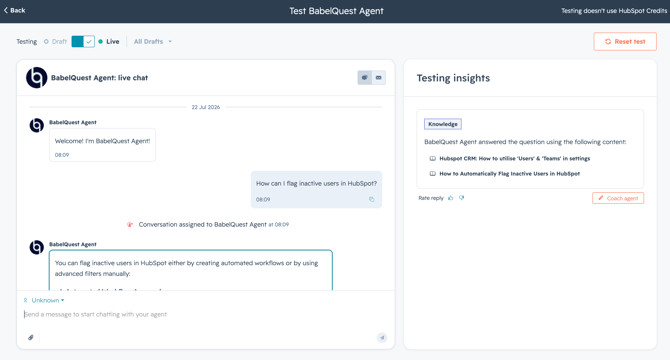
7. Roll the format out article by article, prioritising by traffic or by what's showing up in the unanswered-question log — not alphabetically.
Picture a large Further Education College, where their old website chatbot was pulling from uncontrolled sources, answering questions incorrectly, and giving the team no reporting to understand what prospective students were actually asking. It also left evenings and weekends uncovered, exactly when many applicants were making decisions, and there was no spare capacity internally to keep correcting it.
"Our old chatbot was clunky - no reporting, and you couldn't exclude anything, so it would pick up random things and tell people we had a swimming pool. We don't have a swimming pool. It wasn't answering questions correctly, and we couldn't even see what people were asking."
That is why article structure matters so much with Customer Agent. When the answer is buried deep in a long paragraph, the agent can pull the wrong part and return something true but incomplete. When the direct answer moves to the top and the exception gets its own line, the same question becomes far more likely to be answered correctly first time.
Don't try to reformat your entire knowledge base in one sprint — pick the articles doing the most damage first, using the unanswered-question log as your guide, and expand from there. This usually sits with whoever owns your Service Hub knowledge base content, working alongside your support team lead who actually knows which questions the agent keeps getting wrong.