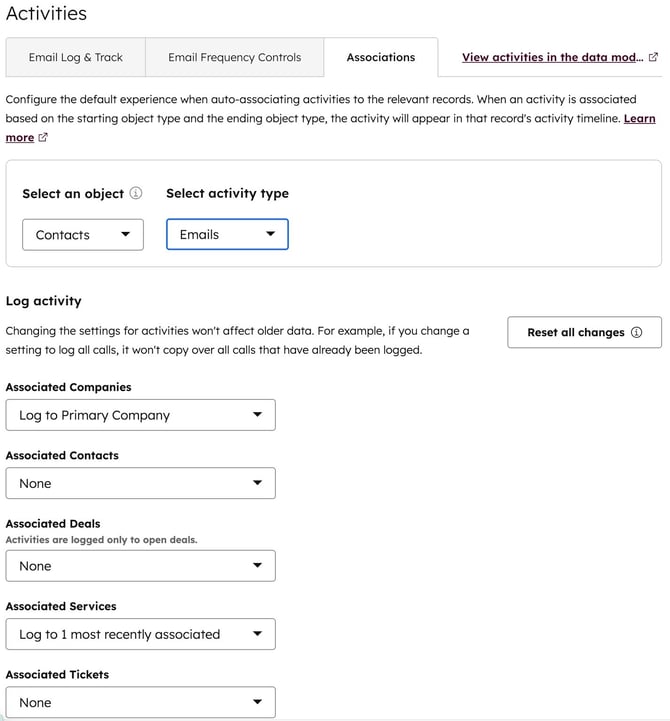
Overview
Activity associations in HubSpot (emails, calls, meetings) directly impact:
- CRM data quality
- Reporting accuracy
- Workflow reliability
- AI-generated summaries and insights
When associations are misconfigured, activities attach to irrelevant records, creating noise across the system.
This guide outlines how to audit, fix, and control activity associations to ensure your CRM remains accurate and usable.
Problem
By default, HubSpot often associates activities across multiple related records:
- Contacts → Companies
- Contacts → Open Deals
- Meetings → All invited contacts and their associated records
This can lead to:
- Activities linked to unrelated deals
- Overloaded timelines
- Duplicate or misleading reporting
- Inaccurate AI summaries
Root Cause
The most common issue is over-association:
Associating every activity to every related object does not improve data quality — it reduces it.
HubSpot does not automatically determine the most relevant association. It logs broadly based on relationships.
Solution
Step 1: Audit Current Activity Associations
Review how activities are currently distributed:
- Check records with:
- Multiple deal associations per activity
- Irrelevant meetings or emails on deal timelines
- Identify patterns:
- Are meetings attaching to all open deals?
- Are emails logging across unnecessary objects?
Step 2: Identify Trust Breakpoints
Gather feedback from users:
- Where do timelines feel inaccurate?
- Which records contain irrelevant activities?
- When do reps question the data?
Focus on where context is breaking down, not just volume.
Step 3: Define Association Rules
Establish clear internal standards:
- Contacts
- Always associated with activities
- Companies
- Inherit activities via contacts (avoid direct over-association)
- Deals
- Only associate activities that directly impact deal progression
Example rule:
A meeting should only be associated with a deal if it directly relates to that deal’s stage, negotiation, or outcome.
Step 4: Configure and Enforce with Automation
Use workflows to control association behavior.
Example: Limit Deal Associations on Activities
Trigger: Activity (meeting/call/email) is created
Condition: Number of associated deals > 1

Actions:
- Remove all deal associations
- Re-associate to the most recently updated deal
Advanced (Operations Hub – Custom Code)
exports.main = async (event, callback) => {
const deals = event.inputFields['associatedDeals'];

if (deals.length > 1) {
const mostRecentDeal = deals.sort((a, b) => b.updatedAt - a.updatedAt)[0];

callback({
outputFields: {
keepDeal: mostRecentDeal.id
}
});
}
};
Step 5: Align Teams
Document and communicate:
- What “correct association” looks like
- When to manually associate activities
- When not to associate to deals
Ensure:
- Sales understands timeline expectations
- Managers trust reporting outputs
- RevOps maintains consistency
Best Practices
- Avoid auto-associating activities to multiple deals
- Prioritize relevance over coverage
- Regularly audit activity distribution
- Use automation to enforce rules, not just rely on user behavior
Expected Outcome
After implementing this approach:
- Timelines become cleaner and easier to trust
- Reports reflect accurate activity attribution
- AI-generated summaries improve in quality
- Sales teams spend less time correcting data
Key Takeaway
Activity associations are a foundational data layer in HubSpot.
If they are not controlled:
- Reporting becomes unreliable
- Automation becomes inconsistent
- AI outputs degrade
If they are managed intentionally:
- Your CRM becomes significantly more accurate and usable