Prerequisites
To complete this, you need:
-
Sales Hub Enterprise
-
Quotes tool enabled
-
Permission to manage quote approvals
Why Traditional Quote Approvals Fail
Many sales teams rely on blanket approvals, where every quote requires manager review. While this feels safe, it creates three problems:
-
Approval fatigue: Managers rubber-stamp without scrutiny
-
Slower deal velocity: Low-risk deals stall unnecessarily
-
Inconsistent governance: Risky deals aren’t clearly identified
The solution is not fewer approvals; it’s smarter approvals.
What’s New: Conditional Quote Approvals
HubSpot’s updated Quotes settings now include a toggle that allows approvals to run only when an initial quote meets defined criteria.
This means:
-
Approvals are no longer all-or-nothing
-
Conditions are evaluated at quote publish time
-
Logic is configured directly in Settings → Objects → Quotes → Approvals
No workflows are required for supported quote properties.
Core Concept: Approval Logic Is Property-Based
Even with the new UI, approvals still follow one rule:
Quote approvals evaluate quote properties, not intent or context.
If a condition appears in the approval filter UI, it can be evaluated natively.
If it does not, the data must be surfaced as a property first.
Step 1: Enable Conditional Quote Approvals
-
Navigate to Settings → Objects → Quotes
-
Open the Approvals tab
-
Turn Quote approvals ON
-
Select Standard approvals
-
Choose:
-
“When an initial quote meets criteria”
-
This unlocks the condition builder.
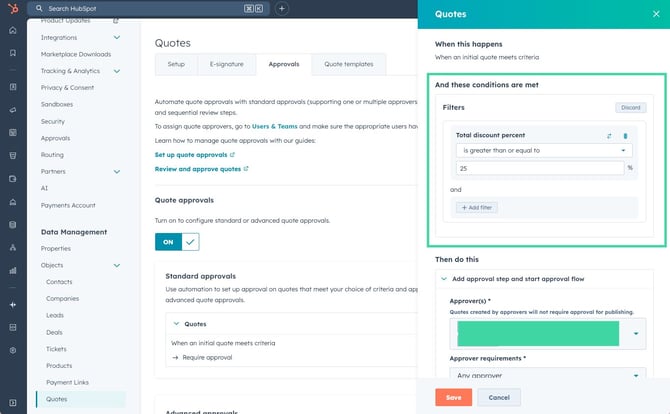
Step 2: Configure a Discount-Based Approval (Primary Use Case)
Use Case
Require approval only when discounts exceed your approved threshold.
Example Configuration
Condition
-
Property:
Total discount percent -
Operator:
is greater than or equal to -
Value:
25
Result
-
Quotes below 25% discount publish immediately
-
Quotes at or above 25% require approval
This is now fully native and requires no calculated properties or workflows.
Step 3: Assign Approvers
In the same approval rule:
-
Select one or more Approvers
-
Define approval requirements (any approver vs all approvers)
Important behaviour:
-
Quotes created by listed approvers do not require approval
-
Approval is enforced before the quote can be published
Step 4: Understand Which Properties Are Approval-Safe
Quote Properties That Work Natively
These typically appear in the approval condition picker:
-
Total discount percent
-
Subtotal / total amount
-
Term length
-
Quote owner
-
Deal association properties (limited set)
If a property is selectable in the UI, it is safe to use.
Properties That Still Require Modelling
Some conditions are not directly evaluable, even with the new toggle.
E-Signature or Contract Method
-
If not exposed as a quote property in the filter UI:
-
Create a custom quote property
-
Stamp its value via workflow
-
Use that property in approvals
-
Line-Item–Specific Risk
-
Approvals cannot evaluate individual SKUs or line items inline
-
You must:
-
Roll up line-item logic into a quote or deal property
-
Then reference that property in the approval condition
-
The new UI improves simplicity, not relational complexity.
Step 5: Enforce the Guardrails
To prevent bypassing approvals:
-
Lock discount and pricing fields after approval
-
Prevent quote edits once approved
-
Restrict who can edit approval-related properties
Approvals should be enforceable controls, not advisory checks.
Business Impact
With conditional quote approvals in place:
-
Low-risk quotes move instantly
-
Managers review only exception cases
-
Approval fatigue is eliminated
-
Margin protection is consistent and auditable
Approvals become a safety net, not a bottleneck.
Key Takeaway
HubSpot quote approvals now support native, conditional logic — but they are still powered by properties.
Use the new approval conditions wherever possible, and rely on data modelling only when the condition cannot be evaluated directly.
Next Steps
-
Review your current quote approval rules
-
Identify which approvals can be simplified using native conditions
-
Remove unnecessary workflows tied to discount checks
-
Model only the edge cases that require additional context