
What it does
The Breeze Content Agent is an AI-powered tool that generates blog ideas, researches topics, and drafts starting-point content — grounded in your own portal data rather than generic AI output.
It factors in:
- What's already performing well in your HubSpot portal
- External search insights (Google, SEMrush, etc.)
- Brand guidelines, tone of voice, and any reference materials you provide (PDFs, style guides, persona docs)
It can also suggest meta titles, meta descriptions, and images — giving your writers a strong, on-brand starting point rather than a blank page.
Availability: Marketing Hub or Content Hub Professional and Enterprise. Agent runs consume HubSpot Credits, so check your credit balance under billing before scheduling it to run regularly.
The challenge
Content teams struggle to balance creativity with data-driven topic selection. Manual keyword and competitor research is slow, and writers lose time getting started. The Content Agent compresses research and ideation into minutes while factoring in your SEO focus and brand requirements — you keep the editorial judgement, it does the legwork.
How to implement it
1. Set up the agent
- Go to Breeze > Marketplace and search for the Blog Research Agent.
- Give it instructions and context: target audience, country code, SEO or AEO focus, brand guidelines, and any reference documents.
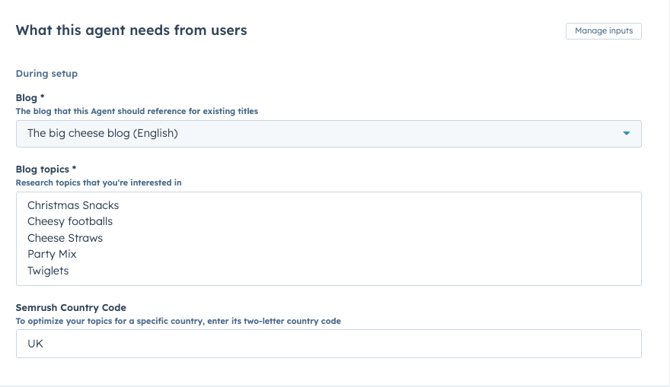
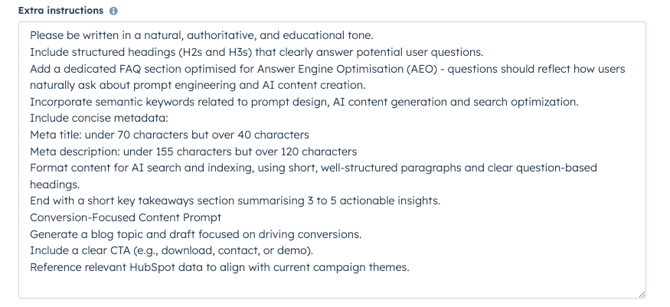
2. Customise its knowledge:Tip: The more specific the brief, the better the output. "B2B revenue operations leaders evaluating HubSpot" will outperform "business audience" every time.
- Specify what the agent can access — internal content, external sources, images.
- Define any constraints or style preferences (e.g., UK English, no em dashes, always reference a customer story).
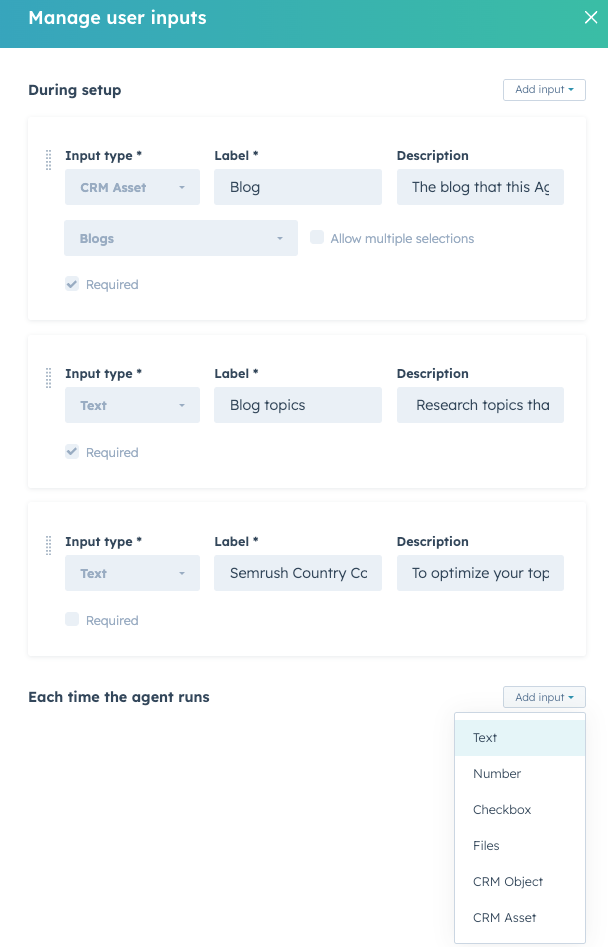
3. Run the agent
- Test the agent, then publish it to run immediately.
- You can also schedule it — a monthly run works well as an automated brainstorm feeding your content calendar. If your portal has access to the Run Agent workflow action (in beta), you can even trigger it from a workflow.
4. Review the outputs
- The agent returns multiple topic ideas with suggested meta titles, meta descriptions, content angles, its reasoning, and supporting sources.
- Always put a human editor between the agent and the publish button. The output is a first draft, not a finished article.
5. Use it for content creation
- Go to Content > Blog > AI Suggestions to pick up the generated ideas and drafts.
- Use them as starting points, then edit for accuracy, specificity, and brand voice.
The result
- Writers skip the research and ideation grind and start from a structured brief
- Topics are grounded in what's actually performing — in your portal and in search
- A consistent stream of actionable, on-brand ideas feeding your marketing calendar
Note: HubSpot updated its marketplace agents to a new AI architecture in early 2026, so outputs may look different from older screenshots — smarter reasoning, but worth re-testing your agent's instructions if you set it up last year.
By Carl Griffiths