
The Challenge
Directing an AI Agent to "read a timeline" without guidance can be tricky. Without a focused data source, AI can hallucinate or miss context. It needs a consolidated view of history to make an accurate judgment.
The Solution: Chaining AI Actions
We don't just ask the AI to guess; we build a workflow that prepares the data first. We call this the Summarize-Then-Analyze technique.
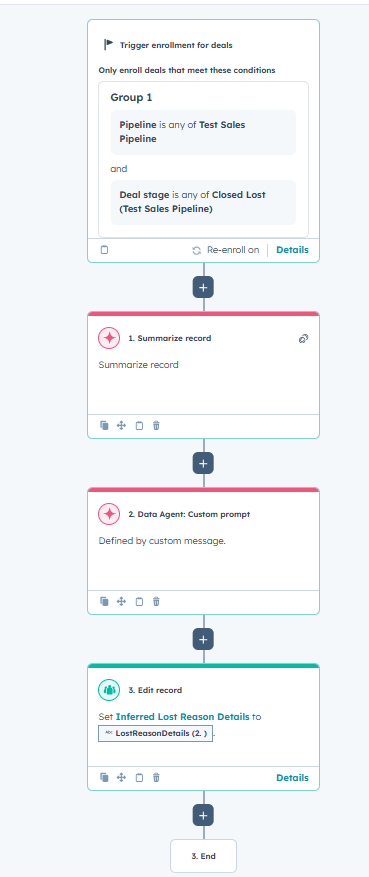
As seen in the workflow logic, this relies on the specific "Data Agent: Custom prompt" action. Here is the flow:
The Trigger: Deal Enrollment. The workflow listens for a specific negative outcome. In our example, we trigger only when a Deal in the "Sales Pipeline" moves to Closed Lost.
Step 1: The Aggregator (Summarize Record). First, the workflow triggers the native "Summarize Record" AI action. This acts as a net, sweeping through the deal’s emails, calls, and notes to generate a comprehensive synopsis of the entire sales conversation.
Step 2: The Analyst (Data Agent: Custom prompt). This is the brain of the operation. We use the Data Agent: Custom prompt action.
- The Input: We feed the output from Step 1 (the Summary) directly into this agent.
- The Prompt: Using the PARSE framework, we instruct the agent to review that summary, ignore administrative fluff, and identify the exact moment friction occurred.
Step 3: The Scribe (Edit Record). Finally, we don't just let the insight float away. We use the "Edit Record" action to copy the Data Agent's answer into a custom multi-line text property called "Inferred Lost Reason."
The Result
- The Dropdown says: "Product Fit"
- The AI Chain reveals: "The Specific Blocker: The deal was lost due to the prospect's compliance requirements for a self-hosted or private cloud solution, which our current offering does not support.
The Context: Tony Luciano, the main contact, confirmed that the procurement and security teams could not proceed with the deal because the absence of a self-hosted option and insufficient permission granularity were deal-breakers, particularly given their defense client requirements. As a result, they are unable to meet regulatory compliance in their operational timeline.
The Sentiment: Tony expressed a willingness to revisit the deal if an appropriate solution becomes available in the future.."
Why this matters
- Zero Hallucinations: By summarizing first, you ground the AI in facts, ensuring the output is accurate.
- Product Roadmap Fuel: Engineering gets specific data on why deals are stalling, not just vague categories.
- Automated Integrity: You bridge the gap between quantitative reporting (What we lost) and qualitative reality (Why we lost it)—without the sales rep typing a single word.
A Note on Credits: This workflow consumes HubSpot AI credits for both the summary and the custom agent analysis. It is powerful, but should be scoped correctly (e.g., prioritized for high-value Enterprise deals) to maximize ROI.
Ready to chain your AI?
Building multi-step AI workflows requires architectural thinking to ensure data flows correctly from the Summary to the Agent, and finally to your Property.
Written by: Sayi Allison - Platform Consultant, BabelQuest