Overview
This approach uses HubSpot’s Default Property Values (Beta) to enforce clean, consistent data at the point of record creation—removing the need for “filler” workflows that exist solely to handle empty fields.
This is not just a UI improvement. When implemented correctly, it becomes a data governance shortcut that simplifies your CRM architecture and stabilizes reporting.
The Problem
Empty properties in HubSpot create:
- Broken reports (“Unknown” / “No value” buckets)
- Inconsistent segmentation
- Extra workflows just to backfill missing data
- API inconsistencies (
nullvsfalsevs empty string)
The Hack
Step 1 — Enable the Feature
- Navigate to: Profile → Product Updates
- Join: “Set default values for properties” (Beta)
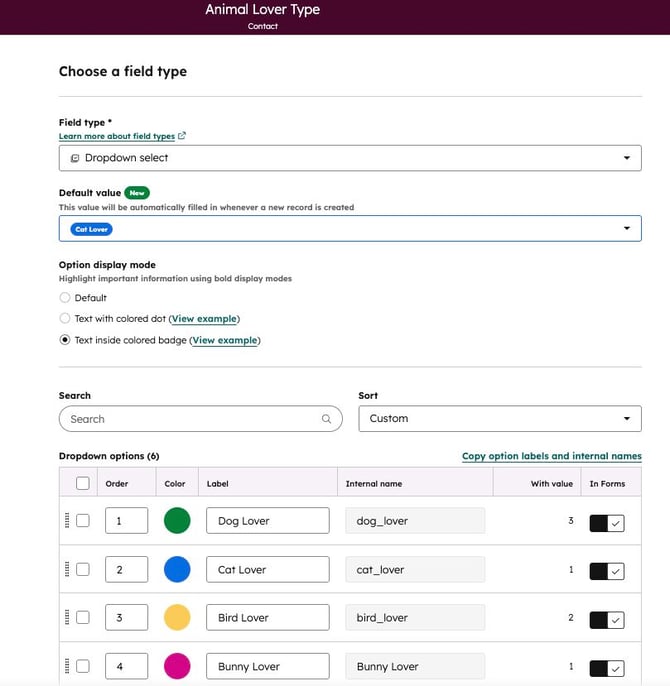
Step 2 — Configure High-Impact Properties
Go to:
Target properties that:
- Frequently show as “Unknown”
- Are required for reporting
- Are boolean or operational flags
Examples:
CountryLifecycle Status FlagsCheckbox fields (True/False)Internal routing properties
Step 3 — Set a Safe Default Value
Inside the property:
- Define a Default Value
Examples:
Is Partner → False
Lead Source → Inbound
What This Actually Solves
1. Kills “Null Value” Workflows
You can remove workflows like:
These become unnecessary for new records.
2. Standardizes Data at Creation Layer
Applies to:
- Forms
- Manual record creation
- Imports
- API-created records (when value is omitted)
3. Stabilizes Reporting Instantly
- No more “Unknown” categories
- Cleaner dashboards and segmentation
- More reliable calculated fields
Where This Becomes a True “Hack”
Use Defaults as a Data Contract Layer
Instead of relying on workflows to “fix” data:
- Treat defaults as minimum viable data standards
- Ensure every record enters the CRM in a usable state
This shifts your architecture from:
To:
Advanced Usage Pattern
Pair Defaults with Lightweight Validation (Not Replacement)
Keep a minimal workflow layer for exceptions:
→ Flag record for review
This ensures:
- Defaults don’t silently introduce bad assumptions
- Data quality remains auditable
Important Constraints
1. Not Retroactive
- Only applies to new records
- Run a one-time cleanup for historical data
2. Does Not Override Incoming Values
If an integration sends:
"country": ""
}
→ HubSpot treats it as a value
→ Default will NOT apply
3. Not a Replacement for Logic
Still use workflows for:
- Conditional routing
- Lifecycle automation
- Data normalization
Best Practice Summary
Use defaults for:
- Boolean fields (
True/False) - Operational flags
- Required reporting baselines
Avoid defaults for:
- Critical segmentation (unless highly controlled)
- Country
- Industry
- Persona