.png?width=2000&height=1125&name=Cloud%20Bridge%20(1).png "Cloud Bridge (1)")

Poor email deliverability in HubSpot is almost always a build-up problem, not a technical one - bounced contacts left in active workflows, dormant addresses still being emailed, high-volume blasts instead of targeted sends. Fixing it means automating bounce handling, running regular database clean-ups, and verifying new contacts at the point of entry. Done consistently, this keeps bounce rates well under the 2% threshold most inbox providers treat as a warning line.
The symptom rarely shows up as a deliverability problem, though. It shows up as a soft pipeline number, months after the list quality actually broke - which is why the fix gets delayed until someone finally checks the sending domain.
Why HubSpot email deliverability breaks as you scale
As a company grows, so do the number of contacts held in the CRM, and list quality rarely keeps pace. Contacts who bounced eighteen months ago are still sitting in active workflows. Dormant addresses are still being emailed on the same schedule as engaged ones. Inbox providers pick up on this pattern well before the marketing team does, and they start routing more of that domain's mail to spam or the promotions tab.
A few signs it's already underway, if you want to check before it shows up in the numbers:
- Bounce rate creeping past 2%, even slightly, on more than one send
- Open rates sliding across the board rather than on one specific campaign
- A growing gap between MQLs generated and MQLs that actually respond to anything
- Contacts who haven't opened an email in six months or more still enrolled in active sequences
Any one of these on its own might be nothing. Two or three together, and it's worth an audit before it gets worse.
How to fix email deliverability in HubSpot
There's no single setting that solves this. It's a handful of unglamorous habits, applied consistently rather than once:
- Bounced contacts get flagged as non-marketing automatically, not reviewed manually once a quarter
- Long-dormant contacts get retired from active sequences rather than left to keep dragging down engagement metrics
- New contacts get checked at the point of entry, using enrichment and bounce verification, rather than added straight into high-volume sends
- Blast-style campaigns get replaced with targeted, segmented nurture, so the list isn't being emailed as one undifferentiated block
None of this is hard to build in HubSpot. Workflows can flag and suppress bounced contacts within minutes of a send. Database clean-up can run on a schedule rather than as a one-off project. Here's what that actually looks like inside a HubSpot workflow, built for one of our customers, Cloud Bridge. It automatically identifies a bounced contact and pulls it out of active sequences before it can do any more damage to sender reputation:
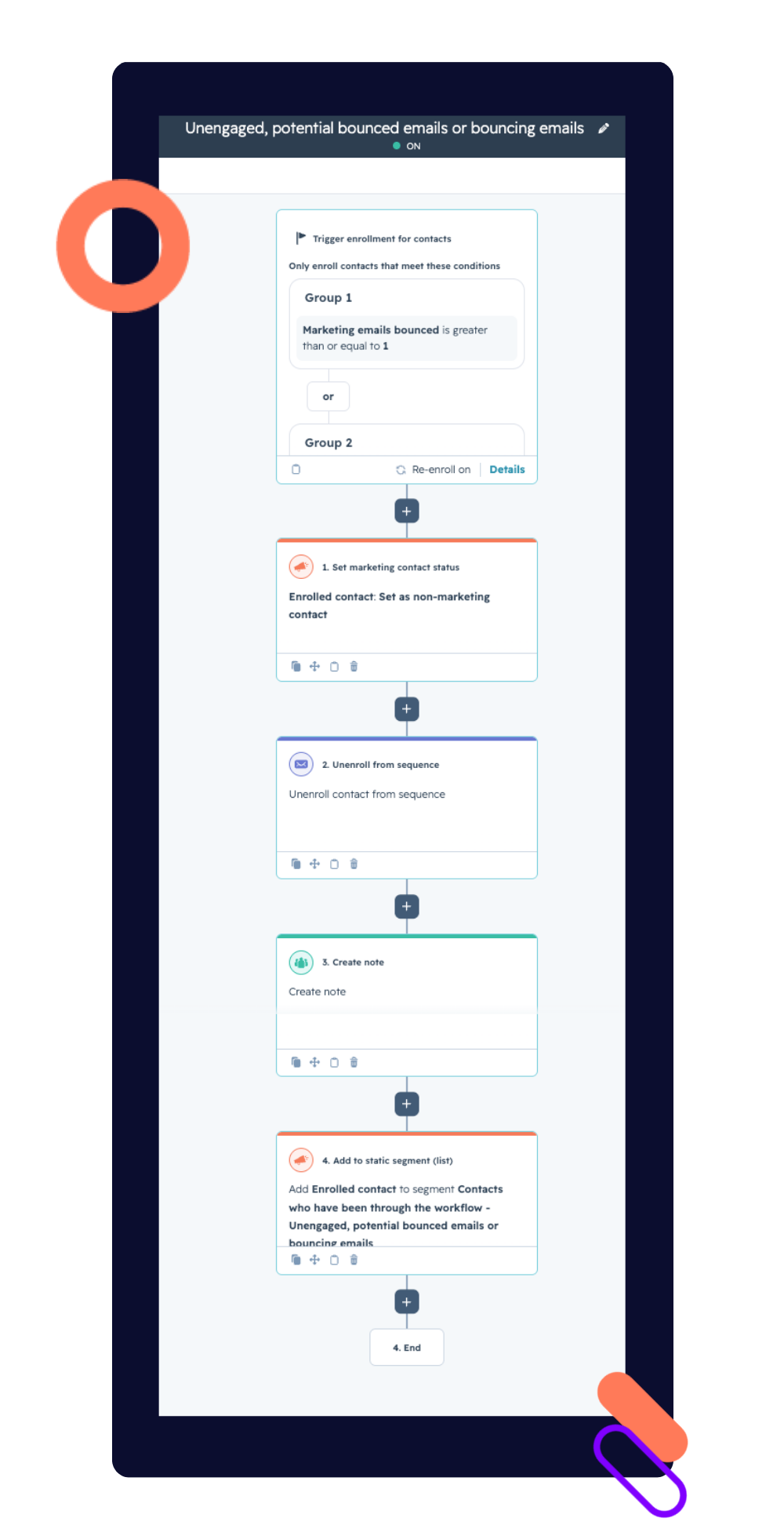
And the database clean-up rule sitting alongside it — any contact untouched for two years, with no website activity, gets moved to non-marketing automatically, rather than sitting there quietly dragging down engagement rates on every send.
The difficulty here is organisational, not technical - someone has to own this as ongoing maintenance, the same way you'd treat server monitoring, rather than a task that gets done once and considered finished.
There is always someone in the business accountable for marketing emails. Writing the copy, building the email, selecting the recipients. We try to optimise subject lines and CTAs. We agonise about open rates. But for some reason, deliverability isn't often in the equation. Perhaps because it feels techy. People turn off when you start talking about domain reputation, sender scores, DMARC. But, it seems obvious to say, there is no point optimising the content if it never reaches the inbox."
Hollie Higa, Head of Marketing, BabelQuest
Keeping HubSpot deliverability fixed, not just fixing it once
A clean-up gets you back under the threshold. It doesn't keep you there. The lists that stay healthy tend to have a few things in common: a monthly (not annual) review of bounce and engagement data, a clear rule for what happens to a contact after a set number of unopened emails, and someone whose job it actually is to look at this rather than assume the automation is handling it silently in the background. Automation does the work. It still needs a person checking that the work is happening.
What it looked like for Cloud Bridge
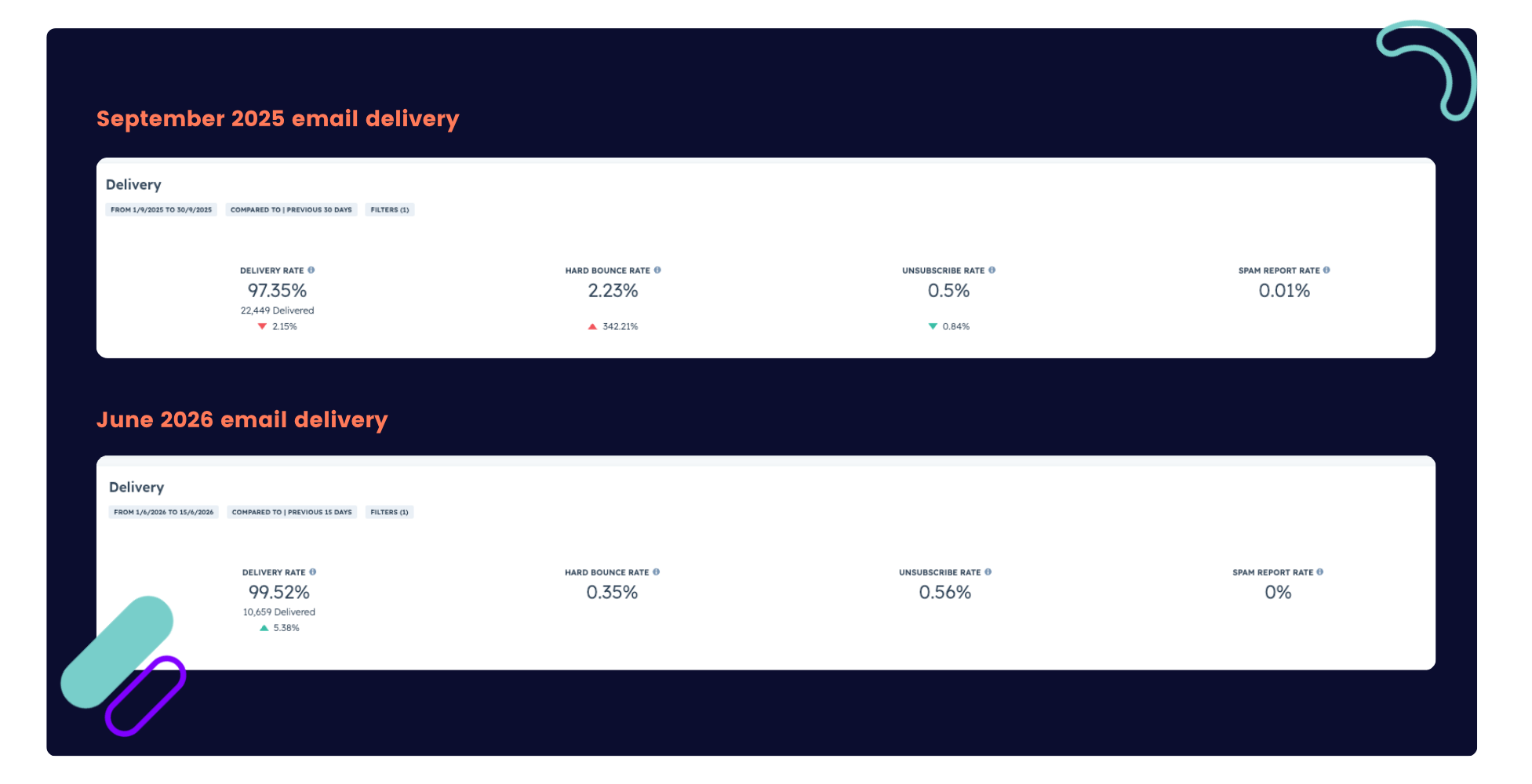
Cloud Bridge, a Premier AWS Partner, hit this exact point. As the company scaled its outbound activity, deliverability risk crept up alongside it - the same pattern, at the same stage most fast-growing tech companies run into it. Working with BabelQuest, Cloud Bridge automated the bounce-handling workflow, ran a database clean-up on dormant contacts, and moved from broad sends to targeted, segmented nurture.
The result: a bounce rate of 0.4%, comfortably inside the 2% threshold most inbox providers treat as a warning line. Not a one-off clean-up win, but what a list looks like when deliverability is actively managed rather than checked once and left alone.
Cloud Bridge case study





.png?width=50)

%20(1).jpg?width=50)
.png?width=50)

.png?width=50)
.png?width=50)


